
Quick start
This page takes an existing app from nothing to a dry run against its real Play listing. It takes about ten minutes, most of it in the Google Cloud and Play consoles.
Before you start
- An app that already exists in the Play Console. The Play API cannot create apps, and the first release of a new app has to be uploaded in the Play Console.
- A Google Play service account key. Connect Google Play shows how to create one; keep the JSON file outside the repository.
- Java 17 or later.
1. Add StorePilot
// app/build.gradle.kts
plugins {
    id("com.android.application")
    id("io.github.muhammedelsami.storepilot") version "0.1.1"
}

storepilot {
    googlePlay {
        serviceAccountJson = providers.environmentVariable("PLAY_SERVICE_ACCOUNT_JSON")
    }
}# Download storepilot-0.1.1.zip from
# https://github.com/muhammedelsami/storepilot/releases and unzip it.
unzip storepilot-0.1.1.zip
export PATH="$PWD/storepilot-shadow-0.1.1/bin:$PATH"
storepilot --versionThen give StorePilot the key:
export PLAY_SERVICE_ACCOUNT_JSON="$(cat ~/keys/play-publisher.json)"export STOREPILOT_GOOGLE_PLAY_SERVICE_ACCOUNT_JSON="$(cat ~/keys/play-publisher.json)"2. Pull your current listing
Start from what is live instead of typing it again. This writes store/ with details.yml, the text of every language, and all images.
./gradlew :app:pullListingstorepilot listing pull --package com.example.notes --metadata-dir app/storeThe Gradle plugin puts the directory next to the module's build file (app/store/) and takes the package name from the release variant.
3. Check it
./gradlew :app:validateListingstorepilot listing validate --metadata-dir app/store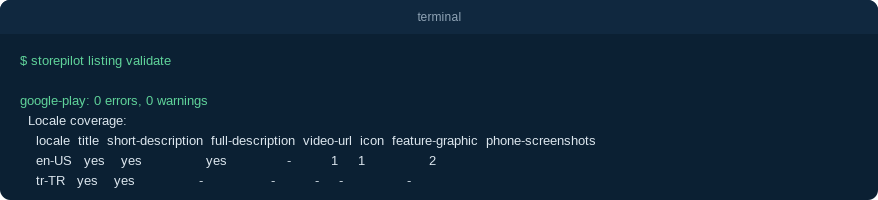
Listings that are live today can still break a rule that Play enforces for new changes, such as a title that grew too long. Fix what the check reports before you push anything.
4. Change something and look at the diff
Edit app/store/listing/en-US/short-description.txt, then compare with the store:
./gradlew :app:diffListingstorepilot listing diff --package com.example.notes --metadata-dir app/store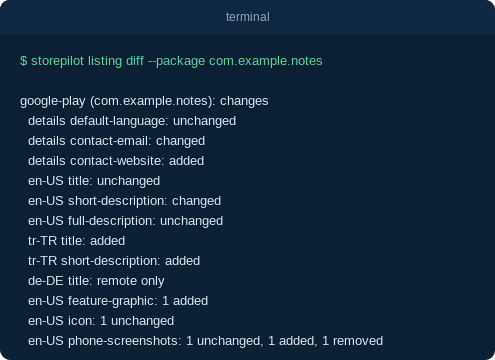
remote only means the store has something the repository does not. StorePilot leaves it alone.
5. Dry run a release
Build the bundle, then let StorePilot plan the release without committing it:
./gradlew :app:publishReleaseBundle -Pstorepilot.dryRun=truestorepilot publish --artifact app/build/outputs/bundle/release/app-release.aab \
--track internal --dry-runA dry run reads the tracks and the listing but discards the Play edit, so nothing changes in the store. Remove the dry-run flag when the plan looks right.
Where to go next
- Publish from CI: GitHub Action.
- Staged rollouts, promotion, and halting: Releases and tracks.
- Every setting in one place: Configuration.