
What StorePilot does
StorePilot keeps an Android app's Google Play presence in the app's repository: the release you upload, the store listing people read, and the graphics they see. You change those files in pull requests like any other code, StorePilot checks them against Google Play's rules, shows what would change in the store, and publishes them.
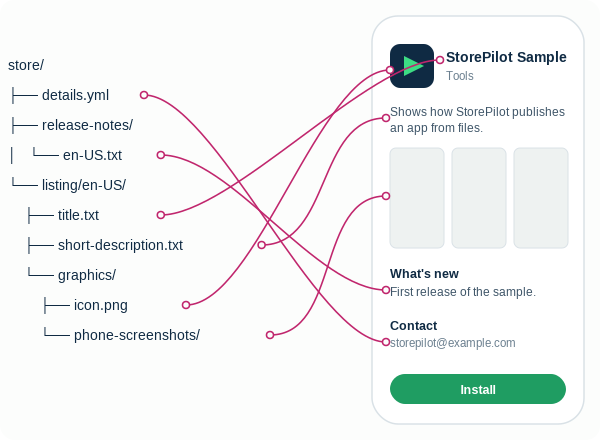
What it handles
| Area | What StorePilot does |
|---|---|
| Releases | Uploads an .aab or .apk to a track with a staged rollout and release notes. Promotes, halts, and resumes releases. |
| Store listing | Title, short and full description, video link, and contact details per language, kept as text files. |
| Graphics | App icon, feature graphic, TV banner, and screenshots for phones, tablets, TV, and Wear OS. |
| Checks | Text limits, image rules, lint rules, and locale coverage, without a network connection. |
| Diff | A field-by-field and image-by-image comparison with the live listing before anything is pushed. |
Three ways to run it
| Best for | Needs | |
|---|---|---|
| Gradle plugin | Android projects that build and publish in one step. Tasks per build variant. | Gradle 8.10+, Android Gradle plugin 8.5+ |
| GitHub Action | Workflows: publish on a tag, check the listing in pull requests. | A runner with Java 17 |
| Command line | Any CI, or a pipeline that already has the .aab or .apk. | Java 17 |
All three use the same engine and read the same store directory, so they behave the same way. The Gradle plugin can write its settings as storepilot.yml for the other two.
What it does not do
- Build your app. StorePilot takes an artifact that your build produced.
- iOS or the App Store.
- Other Android stores, yet. The design leaves room for them; see the roadmap.
- Keyword ranking, competitor research, reviews, ratings, or store statistics.
Next
- Quick start: from an empty directory to a dry run against your listing.
- Connect Google Play: the service account StorePilot uses.