
Your Play Store listing, kept in your repository.
StorePilot checks, compares, and publishes Android releases and Google Play listings from files you review in pull requests. Run it as a Gradle plugin, a GitHub Action, or a command-line tool.
Free and open source under the Apache License 2.0. Google Play today; more Android stores later.
store/ becomes one part of the Play listing. StorePilot keeps them in sync. Start from the tool you already use
All three run the same engine and read the same store/ directory, so a team can mix them: the Gradle plugin on a laptop, the action in CI.
// app/build.gradle.kts
plugins {
    id("com.android.application")
    id("io.github.muhammedelsami.storepilot") version "0.1.1"
}

storepilot {
    googlePlay {
        serviceAccountJson = providers.environmentVariable("PLAY_SERVICE_ACCOUNT_JSON")
    }
}

// ./gradlew validateListing       check app/store/, no network
// ./gradlew publishReleaseBundle upload the release bundle# .github/workflows/publish.yml
- uses: actions/setup-java@v6
with:
distribution: temurin
java-version: 17
- uses: muhammedelsami/storepilot@v0
with:
artifact: app/build/outputs/bundle/release/*.aab
metadata-dir: app/store
track: production
rollout: "0.1"
google-play-service-account-json: ${{ secrets.PLAY_SERVICE_ACCOUNT_JSON }}# Java 17 or later. Download storepilot-0.1.1.zip from the GitHub release.
export STOREPILOT_GOOGLE_PLAY_SERVICE_ACCOUNT_JSON="$(cat play-key.json)"
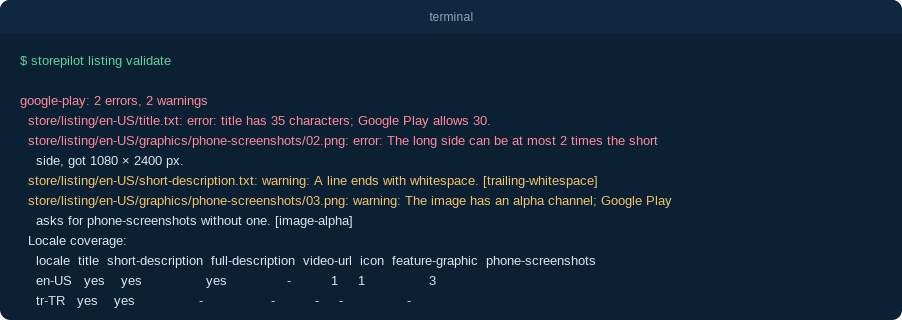
storepilot listing validate
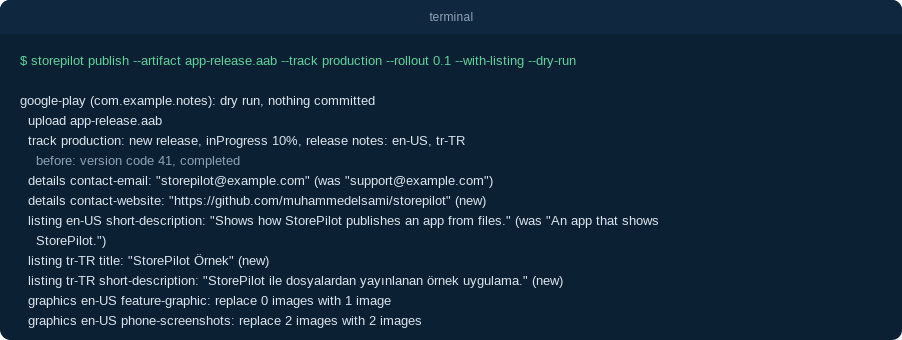
storepilot publish --artifact app-release.aab --track production --rollout 0.1Catch listing problems in the pull request
Play rejects a title that is one character too long or a screenshot with the wrong shape only after you press publish. StorePilot checks the files first, without a network connection.
- Text limits counted the way Play counts them: 30 characters for the title, 80 for the short description, 4000 for the full one, 500 for release notes.
- Image rules for the icon, feature graphic, and every screenshot type: format, size, aspect ratio, and count.
- Lint rules for the small mistakes reviewers miss, such as trailing spaces or the title repeated in the short description.
- Locale coverage, so a language with a missing description stands out.
A release, from files to the store
The same four steps work with every entry point. Nothing reaches Google Play until the last one, and even that can run as a dry run first.
Put the listing in the repository
Write
store/by hand, or pull the live listing of an existing app withstorepilot listing pull. Text, graphics, and release notes become files you can review.Check it in every pull request
validateListingruns as part of./gradlew check, and the action writes the result to the job summary.See what would change
storepilot listing diffcompares every field and image with the live listing.--exit-codefails a job when the store drifted from the repository.Publish
Upload the bundle, set the track and rollout, and push the listing in one edit, so they go live together or not at all.
Works with
- Gradle
- 8.10 or later
- Android Gradle plugin
- 8.5 to 9.x
- Java
- 17 or later
- GitHub runners
- Linux, macOS, Windows
Try it on your app
The quick start takes you from an empty store/ directory to a dry run against your real Play listing.