
Gradle plugin
The plugin adds StorePilot tasks to an Android application module. It reads its settings from the storepilot { } block, finds the bundle or APK of each build variant, and takes the package name from the variant's application ID.
Requires Gradle 8.10 or later, the Android Gradle plugin 8.5 to 9.x, and JDK 17. It supports the configuration cache.
Add the plugin
// app/build.gradle.kts
plugins {
    id("com.android.application")
    id("io.github.muhammedelsami.storepilot") version "0.1.1"
}

storepilot {
    googlePlay {
        serviceAccountJson = providers.environmentVariable("PLAY_SERVICE_ACCOUNT_JSON")
    }
}
That is the whole setup. The defaults: the listing lives in app/store/, releases go to the internal track at 100%, and every non-debuggable variant gets release tasks.
Tasks
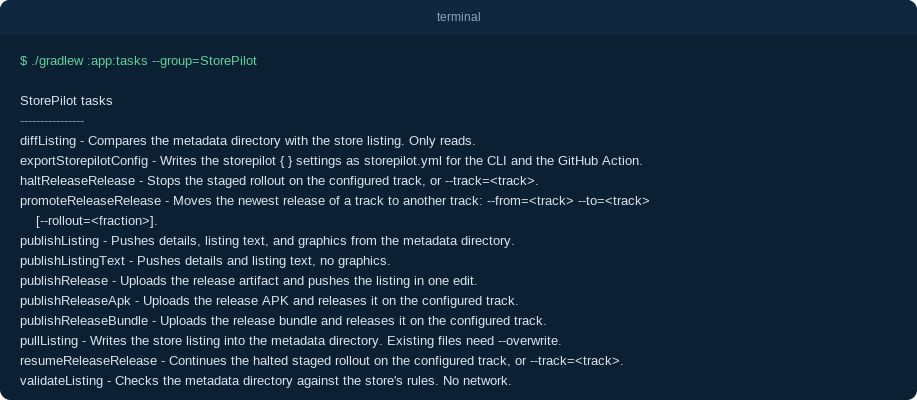
Release tasks, one set per variant
| Task | Does |
|---|---|
publish<Variant>Bundle | Builds the variant's bundle, uploads it, and releases it on the track with its release notes. |
publish<Variant>Apk | The same with the variant's APK. Builds with APK splits should publish the bundle. |
publish<Variant> | Uploads the artifact and pushes the listing in one edit, so both go live together or not at all. |
promote<Variant>Release | Moves the newest release of a track to another: --from=testing --to=production --rollout=0.2. |
halt<Variant>Release | Stops the staged rollout on the configured track, or --track=<track>. |
resume<Variant>Release | Continues a halted rollout. |
For a variant named release, the tasks are publishReleaseBundle, publishRelease, promoteReleaseRelease, and so on.
Listing tasks, one set per module
| Task | Does |
|---|---|
validateListing | Checks the store directory against Google Play's rules. No network. Runs as part of check, and is cached. |
diffListing | Compares the store directory with the live listing. Only reads. |
publishListing | Pushes details, text, and graphics. |
publishListingText | Pushes details and text, no graphics. |
pullListing | Writes the live listing into the store directory. Existing files need --overwrite. |
exportStorepilotConfig | Writes the settings as storepilot.yml for the command line and the action. |
validateListing also writes its report to build/reports/storepilot/validateListing.txt.
Dry run
Add -Pstorepilot.dryRun=true to any task that changes the store. StorePilot reads the tracks and the listing, prints what it would change, and discards the Play edit.
./gradlew :app:publishRelease -Pstorepilot.dryRun=trueGradle's own --dry-run (-m) is different: it only lists the tasks that would run.
All settings
import io.github.muhammedelsami.storepilot.api.ArtifactType
import io.github.muhammedelsami.storepilot.api.ReleaseStatus
import io.github.muhammedelsami.storepilot.engine.config.OnUnsupported

storepilot {
    metadataDir = layout.projectDirectory.dir("store")   // default
    track = "testing"                                     // default: internal
    rollout = 0.2                                         // default: 1.0
    artifactType = ArtifactType.BUNDLE                    // what publish<Variant> uploads; or APK
    onUnsupported = OnUnsupported.FAIL                    // or WARN, see "Listing checks"
    fallbackToDefaultLanguage = false                     // missing text takes the default language's

    // Variants that get release tasks. Default: every non-debuggable variant.
    variants("prodRelease")

    listing {
        graphics = true                                   // false: push text only
        replaceScreenshots = true                         // false: only add new images
    }

    aso {
        disable("title-in-short-description")             // turn off lint rules by ID
        warningsAsErrors = false
    }

    googlePlay {
        serviceAccountJson = providers.environmentVariable("PLAY_SERVICE_ACCOUNT_JSON")
        // or: serviceAccountFile = layout.projectDirectory.file("play-key.json")

        track = "production"                              // overrides the value above
        rollout = 0.1
        releaseStatus = ReleaseStatus.IN_PROGRESS         // DRAFT, IN_PROGRESS, HALTED, COMPLETED
        inAppUpdatePriority = 3                           // 0 to 5, for new releases
        changesNotSentForReview = false
    }
}
Values set directly in storepilot { } are defaults; the googlePlay { } block overrides them. The configuration reference explains every setting.
Keys only as providers or files
serviceAccountJson accepts a Provider<String>, so a key cannot be pasted into the build script: serviceAccountJson = "{ ... }" does not compile. Without a key in the DSL, the tasks use STOREPILOT_GOOGLE_PLAY_SERVICE_ACCOUNT_JSON, then Application Default Credentials.
Package name
For Android projects, the package name is the variant's application ID. Set packageName when you want another one, or when the selected variants have different application IDs and you run a listing task (the listing belongs to one app).
Projects without the Android plugin
The plugin also works in a plain Gradle project, for example one that publishes a bundle built elsewhere. Set the artifact and the package name:
storepilot {
    packageName = "com.example.notes"
    artifact = layout.projectDirectory.file("app-release.aab")
}
The release tasks then have no variant name: publishArtifact, publishStore (artifact and listing in one edit), promoteRelease, haltRelease, and resumeRelease. When packageName is not set, publishArtifact reads it from the bundle or APK.
Share settings with CI
./gradlew :app:exportStorepilotConfigThis writes app/storepilot.yml with every setting except credentials. Commit it, and the command line and the GitHub Action use the same track, rollout, and rules as the plugin.
Sample
samples/android-gradle is a small Android app with a complete store directory. It builds the plugin from the repository, so it is also the quickest way to try a change to StorePilot.